
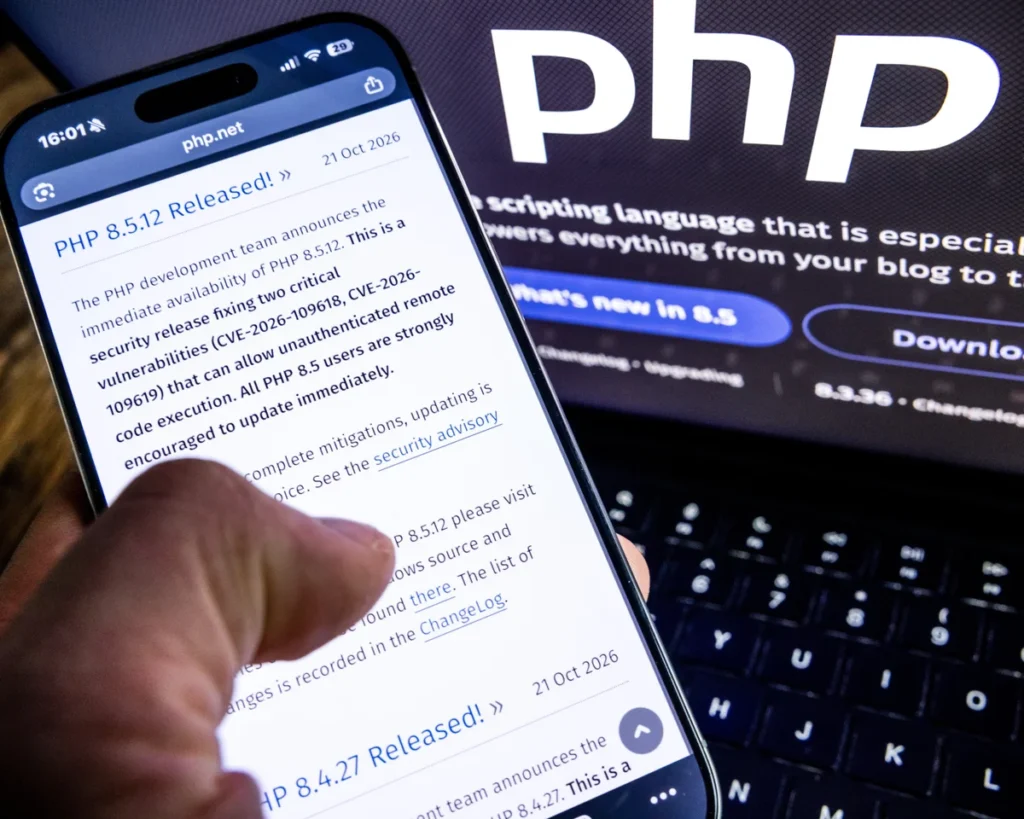
Critical PHP Security Alert: WordPress Websites Must Update Immediately
Published: 22 October 2026 | Category: WordPress, Website Security & Technology News
A major PHP security alert has been issued after two critical vulnerabilities were discovered in PHP, the programming language that powers WordPress and millions of other websites worldwide.
On 21 October 2026, the PHP development team released emergency security updates addressing vulnerabilities that could allow attackers to execute malicious code on affected servers without logging in. The vulnerabilities are identified as CVE-2026-109618 and CVE-2026-109619. Both have been rated critical, and website owners are being urged to take immediate action.
For businesses that rely on their websites to generate enquiries, process payments or store customer information, this is a security issue that should not be ignored.
What Is the New PHP Security Vulnerability?
PHP runs behind the scenes of WordPress websites, processing requests, loading plugins and themes, and communicating with databases. Because so many websites depend on it, vulnerabilities in PHP can have far-reaching consequences.
The latest security release addresses two serious flaws that, under certain conditions, could allow an unauthenticated attacker to execute code on a vulnerable server.
This type of attack is particularly concerning because an attacker may not need a legitimate website login to exploit the underlying vulnerability.
Potential consequences include unauthorised access to server resources, compromised website files, exposure of database information and further malicious activity.
The actual risk depends on the server configuration and whether the affected PHP installation has been patched.
Which PHP Versions Are Affected?
The PHP project has released the following security-fixed versions:
- PHP 8.5.12
- PHP 8.4.27
- PHP 8.3.36
- PHP 8.2.35
If your website uses one of these PHP release branches, ensure that your hosting provider has installed the corresponding security update or a verified equivalent patch supplied by your operating system vendor.
PHP 8.1 and older versions no longer receive standard security updates from the PHP project. If your website is running an unsupported version, contact your hosting provider about upgrading to a supported, compatible version.
Simply updating WordPress, installing the latest plugins or changing your website theme will not patch a vulnerability in the underlying PHP runtime.
What Should WordPress Website Owners Do Now?
If you manage a WordPress website, take the following steps as soon as possible.
1. Check Your PHP Version
Log in to your WordPress dashboard and navigate to:
Tools → Site Health → Info → Server
Look for the PHP version currently running on your website.
You can also find this information in your hosting control panel, depending on your provider.
If you are unsure whether your installation has been patched, ask your hosting provider to confirm the exact version and security status.
2. Contact Your Hosting Provider
Contact your hosting company and request confirmation that the appropriate PHP security patches have been installed across your website’s hosting environment.
Ask the provider to confirm:
- Which PHP version your website is currently using.
- Whether the security fixes for CVE-2026-109618 and CVE-2026-109619 have been applied.
- Whether any additional server-side mitigation or service restart is required.
- Whether your website is running an unsupported PHP version that needs upgrading.
Do not assume your hosting provider has already completed the update simply because your website appears to be working normally.
3. Check WordPress, Plugins and Themes
Although the vulnerabilities originate in PHP rather than WordPress itself, keeping your website software up to date remains essential.
Check for updates to WordPress core, your active theme and all installed plugins. Remove plugins and themes that are no longer required, and only install software from trusted developers.
Before making significant changes, take a full backup of your website files and database.
4. Review Website Security
After your hosting provider confirms that the vulnerability has been addressed, review your website for signs of suspicious activity.
Check for unfamiliar administrator accounts, unexpected changes to PHP files, suspicious plugins and unusual server activity. If you suspect your website has been compromised, contact your hosting provider or a qualified security professional for investigation.
A successful patch prevents the known vulnerability from being exploited through the affected flaw, but it does not automatically remove malicious code that may already have been installed.
5. Do Not Ignore Unsupported PHP Versions
Older PHP versions present an additional security concern because they may no longer receive official security fixes.
If your website relies on legacy plugins, custom functionality or an older WordPress theme, upgrading PHP should be planned carefully to avoid compatibility problems.
Test significant PHP upgrades on a staging website wherever possible, and confirm that essential functionality continues to work before deploying changes to your live website.
Could This Affect Your Business Website?
For a business website, a security incident can mean much more than temporary downtime.
A compromised website could damage your reputation, interrupt online sales, expose sensitive information or prevent potential customers from contacting your business.
For eCommerce websites running WooCommerce, protecting the server and database is especially important because these websites may process customer details and order information.
Even a small company website with a contact form and a handful of pages needs appropriate security maintenance.
Website security should therefore be treated as an ongoing responsibility, not something to consider only after a problem occurs.
Is Updating WordPress Enough?
No. This is one of the most important points for website owners to understand.
WordPress is built primarily using PHP, but the PHP runtime is managed at the server or hosting-environment level.
Installing the latest WordPress release does not automatically update the PHP version running on your server.
Similarly, updating a plugin or theme cannot independently resolve a vulnerability in PHP itself.
The priority is to ensure that the underlying PHP installation has been patched, then review the wider security and compatibility of your WordPress website.
If your hosting provider cannot promptly patch the affected environment, seek urgent guidance on appropriate protective measures. Depending on the circumstances, temporarily taking a vulnerable website offline may be safer than continuing to operate an unpatched server.
Final Thoughts: Take WordPress Security Seriously
The latest PHP security release is a reminder that website security depends on several layers working together: the hosting environment, PHP, WordPress core, plugins, themes and ongoing maintenance.
If you manage a WordPress website, check your PHP version and contact your hosting provider to confirm that the latest critical security updates have been applied.
Do not wait for a website to display an error message or show signs of suspicious activity before investigating a security warning.
Need professional WordPress support?
As a freelance WordPress web designer and developer in Hong Kong with more than 28 years of industry experience, I help businesses maintain, secure and improve their websites. From WordPress maintenance and plugin updates to website troubleshooting, performance optimisation and WooCommerce support, proactive maintenance helps keep business websites reliable and secure.
If you need help reviewing your WordPress website or planning a PHP upgrade, get in touch to discuss your requirements.
Website: https://flashdesigner.com.hk/
Suggested call to action: Contact me today for professional WordPress website support and maintenance.
SEO Settings
SEO title: Critical PHP Security Alert 2026: WordPress Update Guide
Meta description: Two critical PHP vulnerabilities were disclosed in October 2026. Learn which PHP versions are patched and how to protect your WordPress website.
Suggested URL slug: critical-php-security-vulnerabilities-wordpress-2026
Focus keyphrase: WordPress PHP security update
Related keyphrases: PHP critical vulnerabilities 2026, WordPress website security, PHP security patch, WordPress maintenance Hong Kong, PHP version update
Suggested featured image text: Critical PHP Security Alert – Protect Your WordPress Website
Suggested tags: WordPress Security, PHP Security, Website Maintenance, WordPress Development, Cybersecurity, WooCommerce
Official Sources
- PHP security announcements: https://www.php.net/
- WordPress security news: https://wordpress.org/news/category/security/
- WordPress developer documentation on common errors: https://developer.wordpress.org/advanced-administration/wordpress/common-errors/
Security information checked against announcements available on 22 October 2026. Always confirm the current patch status with your hosting provider before making changes to a live website.
