WordPress DDOS Shield plugin provides robust protection against denial-of-service (DoS) attacks on your WordPress site. It implements IP-based rate limiting, with configurable settings for subscribers, non-logged-in users, and verified bots, while excluding administrators and other non-subscriber roles. It features advanced bot detection to identify and limit suspicious bots, immediate blocking of malicious bots by User Agent, and supports Cloudflare for accurate client IP detection. Static assets (e.g., CSS, JS, images) are excluded to maintain site performance. An intuitive admin panel allows you to configure rate limits, bot exclusions, trusted bot IP ranges (with automatic duplicate removal), blocked bots by User Agent, log expiration settings, and view logs for blocked IPs, banned IPs, and high traffic bots with auto-refresh every 30 seconds, all with User Agent details and timestamps. You have the ability to export **Excluded Bots**, **Bot IP Ranges**, and **Blocked Bots** lists to .txt files and import new entries to append to existing lists without duplicates. Daily bar charts for Blocked IPs, Banned IPs, and High Traffic Bots are displayed above the logs for quick visual insights.
Key Features:
– Rate limiting based on IP for subscribers and non-logged-in users, with configurable maximum requests and time window.
– Excludes non-subscriber logged-in users (e.g., administrators, editors) from rate limiting.
– Advanced bot detection to identify suspicious bots (bots using trusted User Agents but from unverified IPs).
– Suspicious bots are subject to the same rate limiting as regular users and logged with User Agent in the Blocked IPs Log.
– Immediate blocking of malicious bots by User Agent (e.g., MJ12bot, SemrushBot, DotBot by default) with customizable settings and logging.
– Configurable rate limiting for verified excluded bots (default: 100 requests per minute), with logging for bots exceeding this limit.
– High Traffic Excluded Bots Log to track verified bots with excessive requests, including IP, User Agent, and timestamp.
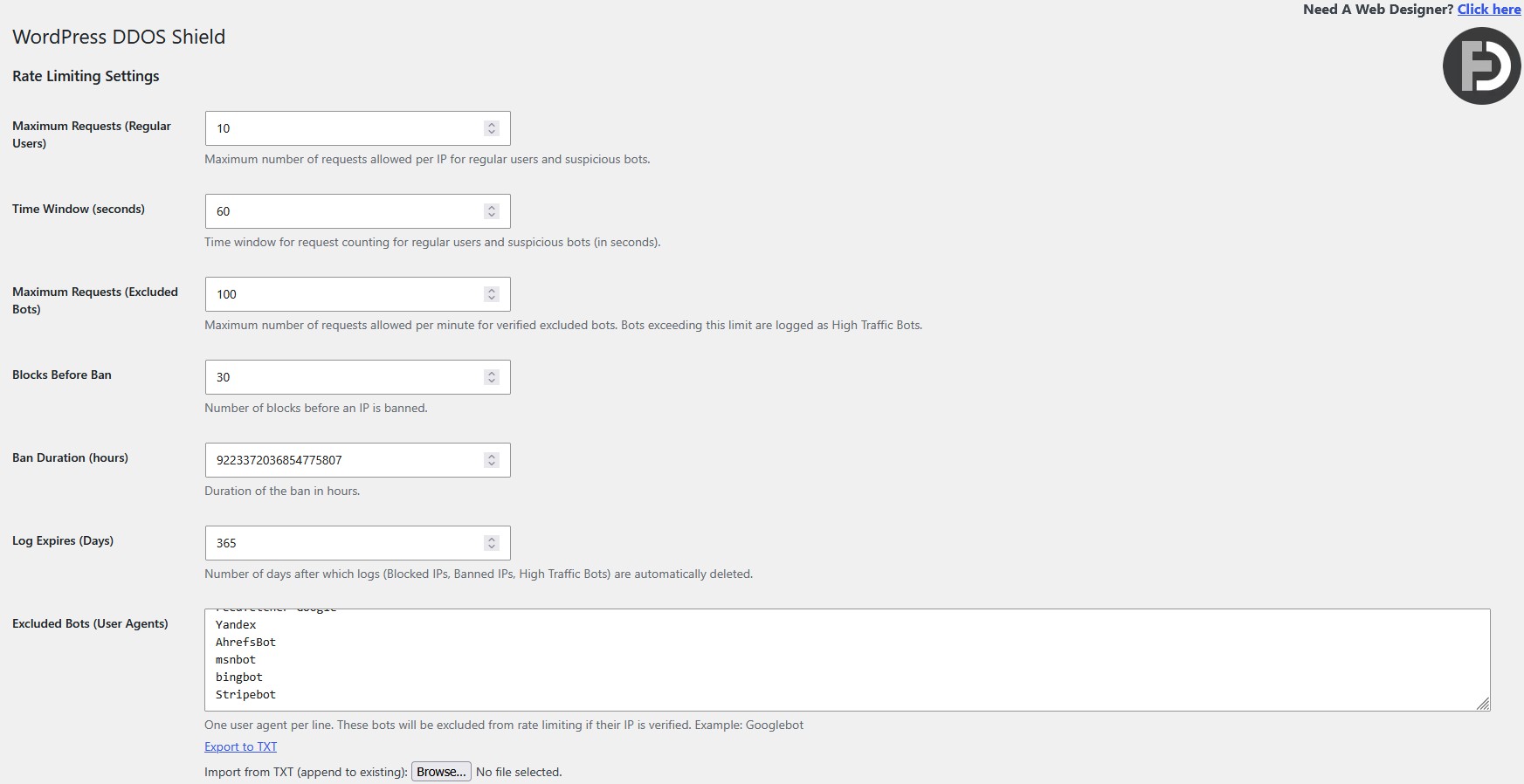
– Admin panel to configure maximum requests, time window, excluded bots, trusted bot IP ranges, blocked bots (User Agents), blocks before ban, ban duration, high traffic bot limits, and log expiration (days).
– Export **Excluded Bots**, **Bot IP Ranges**, and **Blocked Bots** lists to .txt files for backup or transfer.
– Import .txt files for **Excluded Bots**, **Bot IP Ranges**, and **Blocked Bots** to append new entries to existing lists, with automatic duplicate removal.
– Automatic removal of duplicate IP ranges in the **Bot IP Ranges** field on save, keeping the first occurrence.
– Support for Cloudflare real IP detection using `CF-Connecting-IP` and `X-Forwarded-For` headers.
– Excludes static assets (CSS, JS, images, fonts, etc.) from rate limiting to optimize performance.
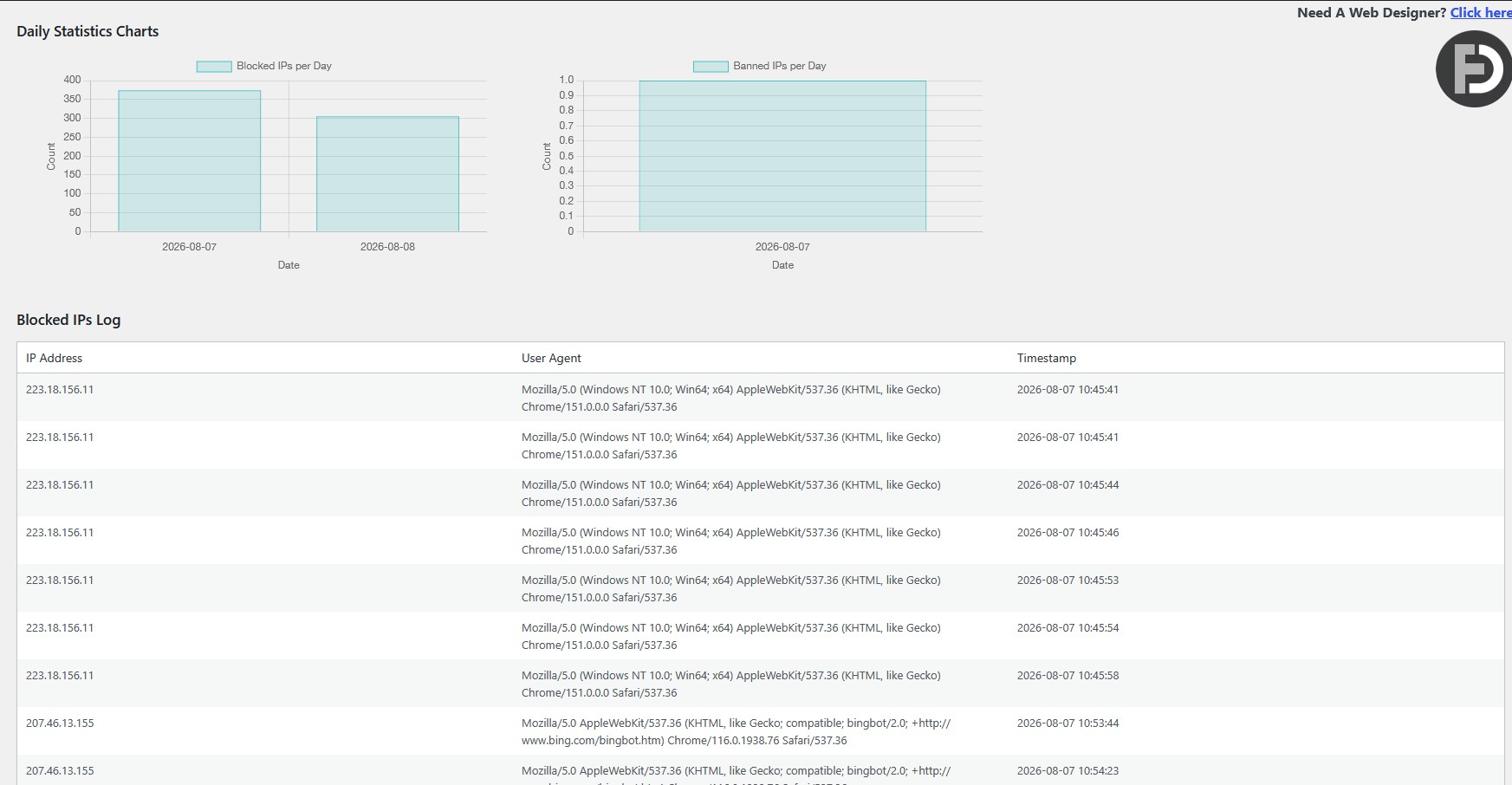
– Logs blocked IPs, banned IPs, and high traffic bots with IP, User Agent, and timestamps using the WordPress timezone, viewable in the admin panel with options to clear logs and auto-refresh every 30 seconds.
– Daily bar charts for Blocked IPs, Banned IPs, and High Traffic Bots displayed above the logs in the admin panel for visual statistics.
– Automatic log expiration (Blocked IPs, Banned IPs, High Traffic Bots) after a configurable number of days (default: 5 days), with hourly cleanup via WordPress Scheduler.
– All error messages and logs prefixed with “Anti Browser DDoS Protection: ” for clarity.
– Donate link in the admin panel to support the project.
– Automatic cleanup of transients, blocked IPs, banned IPs, high traffic bots, blocked bots, bot IP ranges, and log expiration settings on plugin deactivation to prevent database bloat.
FAQs:
What is the plugin cost?
Please fill out the enquiry form below with your website & information.
Can you install the plugin on my website?
Yes, I can install the plugin on your website.
Does this plugin work with Cloudflare?
Yes, the plugin supports Cloudflare by using the `CF-Connecting-IP` header to detect the real client IP, ensuring accurate rate limiting and logging.
Can I exclude specific bots from rate limiting?
Yes, you can add User Agents (e.g., Googlebot, Bingbot) in the **Excluded Bots** field in the admin panel. Bots from trusted IP ranges (configured in **Bot IP Ranges**) are exempt from regular rate limiting but are subject to a separate limit (default: 100 requests per minute). You can export the list to .txt or import from .txt to append new entries.
Can I block specific bots immediately?
Yes, you can add User Agents (e.g., MJ12bot, SemrushBot, DotBot) in the **Blocked Bots (User Agents)** field in the admin panel. These bots are blocked immediately, logged in the Blocked IPs Log with their User Agent, and receive an “Anti Browser DDoS Protection: Blocked Bot Access Denied” message. You can export the list to .txt or import from .txt to append new entries.
How are suspicious bots handled?
Bots with trusted User Agents (e.g., Googlebot) but from unverified IPs are flagged as suspicious, logged in the Blocked IPs Log with their User Agent, and subjected to the same rate limiting as regular users (e.g., 10 requests per 60 seconds).
How are high traffic excluded bots handled?
Verified excluded bots (from trusted IP ranges) exceeding the configured limit (default: 100 requests per minute) are logged in the High Traffic Excluded Bots Log with their IP, User Agent, and timestamp. They are not blocked but monitored for high activity.
Can I manage trusted bot IP ranges?
Yes, you can configure trusted bot IP ranges in the **Bot IP Ranges** field in the admin panel (Settings > Anti DDoS). Enter ranges in CIDR format (e.g., 66.249.64.0/19), one per line. Duplicate ranges are automatically removed on save. You can export the list to .txt or import from .txt to append new entries. Update every 6 months.
Are static assets like CSS and JS rate-limited?
No, the plugin excludes common static assets (e.g., .css, .js, .jpg, .png) to prevent performance issues.
Are logged-in users rate-limited?
Only users with the `subscriber` role are rate-limited. Administrators, editors, and other non-subscriber roles are exempt.
How do I view blocked, banned, or high traffic bot IPs?
Go to **Settings > Anti DDoS** to see the **Blocked IPs Log**, **Banned IPs Log**, and **High Traffic Excluded Bots Log** tables, which list IPs, User Agents, timestamps, and ban expiration times with auto-refresh every 30 seconds. Daily bar charts are displayed above the Blocked IPs Log for visual insights. You can clear the logs using the provided buttons.
How does log expiration work?
The **Log Expires (Days)** setting (default: 5 days) automatically deletes Blocked IPs, Banned IPs, and High Traffic Bots logs older than the specified number of days. Cleanup runs hourly via the WordPress Scheduler.
Can I export or import bot lists?
Yes, you can export **Excluded Bots**, **Bot IP Ranges**, and **Blocked Bots** lists to .txt files via links in the admin panel. You can also import .txt files to append new entries to these lists, with duplicates automatically removed on save.
What happens when I deactivate the plugin?
The plugin automatically deletes its transients, blocked IP logs, banned IP logs, high traffic bot logs, blocked bots, bot IP ranges, and log expiration settings from the database to prevent bloat.